wayprompt
Wayprompt is a pinentry drop-in replacement for Wayland. It can also be used in scripts and as an ssh-askpass prompt.
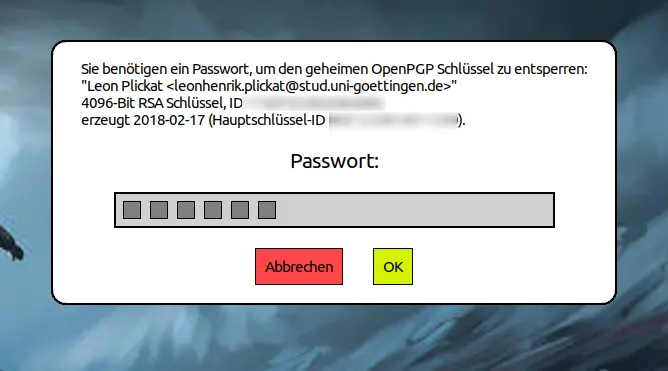
It works well for my use case, which is why I don't really have any motivation to work much on it anymore. Also because upgrading zig versions is starting to get tedious. I am considering creating a simpler version of it in C.
It should work with all Wayland servers that support the zwlr-layer-shell↗ protocol.
You can find code repository on sourcehut↗.
wayprompt(1)
WAYPROMPT(1)                             General Commands Manual                            WAYPROMPT(1)

NAME
     wayprompt - prompt dialog for Wayland

SYNOPSIS
     wayprompt [-h] [--help]
     wayprompt [--title] [--description] [--prompt] [--error] [--button-ok] [--button-no-ok] [--button-
               cancel] [--wayland-display] [--get-pin] [--json]

DESCRIPTION
     wayprompt  is  a  prompt dialog tool for Wayland.  It can display messages, optionally with buttons
     and query for secrets.  The wayland server must support  the  wlr-layer-shell-unstable-v1  protocol
     extension.

     The  wayprompt  executable  described  in  this  manual page represents the command line version of
     wayprompt.  The following other versions are available as well:

     • pinentry-wayprompt(1): The pinentry version of wayprompt.

     • wayprompt-ssh-askpass(1): The ssh-askpass version of wayprompt.

     All wayprompt versions use the same configuration file.  Read wayprompt(5) for more information  on
     configuring wayprompt.

OPTIONS
     -h, --help
            Print help text and exit.

     --title <string>
            Set the title of the dialog window.

     --description <string>
            Set the main text of the dialog window.

     --prompt <string>
            Set the prompt over the pin area.  This may only be specified in combination with --get-pin.

     --error <string>
            Set the error message displayed on the bottom of the dialog window.

     --button-ok <string>
            Set  the  text  of the ok button.  Note that the button is only displayed if text is set for
            it.

     --button-cancel <string>
            Set the text of the cancel button.  Note that the button is only displayed if  text  is  set
            for it.

     --button-not-ok <string>
            Set  the  text  of the not-ok button.  Note that the button is only displayed if text is set
            for it.

     --wayland-display <string>
            Set the wayland display name wayprompt should connect  to.   Note  that  normally  wayprompt
            tries to get this from the WAYLAND_DISPLAY environment variable.

     --get-pin
            Active the pin mode, allowing users to type a secret into wayprompt.

     --json
            Format output as JSON, useful for machine parsing.

OUTPUT
     wayprompt outputs status in a simple format to stdout.  The first line will be

     user-action: <status>

     where  <status>  is one of either ok, not-ok or cancel.  Is --get-pin used, making wayprompt prompt
     for a secret, then a second line is outputted.  This is either

     pin: <secret>

     in the case of the ok button being used or the Enter key being pressed, where <secret> is  the  en‐
     tered secret.  Or alternatively

     no pin

     in  the case of either the not-ok or cancel button being used, the Escape key being pressed, or the
     secret being empty on confirmation.

RETURN VALUE
     The command line version of wayprompt will exit with one of the following commands.
                 ┌───────┬──────────────────────────────────────────────────────────────────────────┐
                 │ Value │                               Explanation                                │
                 ├───────┼──────────────────────────────────────────────────────────────────────────┤
                 │     0 │ The user triggered "ok" (by pressing Enter or clicking the button).      │
                 ├───────┼──────────────────────────────────────────────────────────────────────────┤
                 │    10 │ The user triggered "cancel" (by pressing Escape or clicking the button). │
                 ├───────┼──────────────────────────────────────────────────────────────────────────┤
                 │    20 │ The user triggered "not-ok" (by clicking the button).                    │
                 ├───────┼──────────────────────────────────────────────────────────────────────────┤
                 │     1 │ An error occured.                                                        │
                 └───────┴──────────────────────────────────────────────────────────────────────────┘

AUTHOR
     Leon Henrik Plickat

SEE ALSO
     pinentry-wayprompt(1), wayprompt(5)

git.sr.ht/~leon_plickat/wayprompt              2023-06-03                                   WAYPROMPT(1)
wayprompt-ssh-askpass(1)
WAYPROMPT-SSH-ASKPASS(1)                 General Commands Manual                WAYPROMPT-SSH-ASKPASS(1)

NAME
     wayprompt-ssh-askpass - Wayland-native ssh-askpass implementation

SYNOPSIS
     wayprompt-ssh-askpass

DESCRIPTION
     The  wayprompt-ssh-askpass  executable described in this manual page represents the ssh-askpass im‐
     plementation based on wayprompt.  For general information on wayprompt, read wayprompt(1).

USE WITH SSH
     To use wayprompt-ssh-askpass  as the askpass program for ssh(1) as well as for programs  that  wrap
     it,  like git(1) or rsync(1), you need to set and export the SSH_ASKPASS env var to the path to the
     wayprompt-ssh-askpass executable.

     By default, ssh will only use the configured askpass program if it is not attached to  a  terminal.
     To force ssh to always use the askpass program, set and export SSH_ASKPASS_REQUIRE=force.

RETURN VALUE
     wayprompt-ssh-askpass will exit with one of the following commands.
     ┌───────┬────────────────────────────────────────────────────────────────────────────────────────────────────┐
     │ Value │                                            Explanation                                             │
     ├───────┼────────────────────────────────────────────────────────────────────────────────────────────────────┤
     │     0 │ User triggered "ok" (either by pressing Enter or by clicking the button).                          │
     ├───────┼────────────────────────────────────────────────────────────────────────────────────────────────────┤
     │     1 │ User triggered "cancel" (either by pressing Escape or by clicking the button) or an error occured. │
     └───────┴────────────────────────────────────────────────────────────────────────────────────────────────────┘

AUTHOR
     Leon Henrik Plickat

SEE ALSO
     wayprompt(1), wayprompt(5), ssh(1),

git.sr.ht/~leon_plickat/wayprompt              2024-03-19                       WAYPROMPT-SSH-ASKPASS(1)